Skip to content
Rabat, Morocco
Posts

I Built an IDE That Embeds Your Android and iOS Emulators Directly — Here's Why

April 12, 2026
I Built an IDE That Embeds Your Android and iOS Emulators Directly — Here's Why
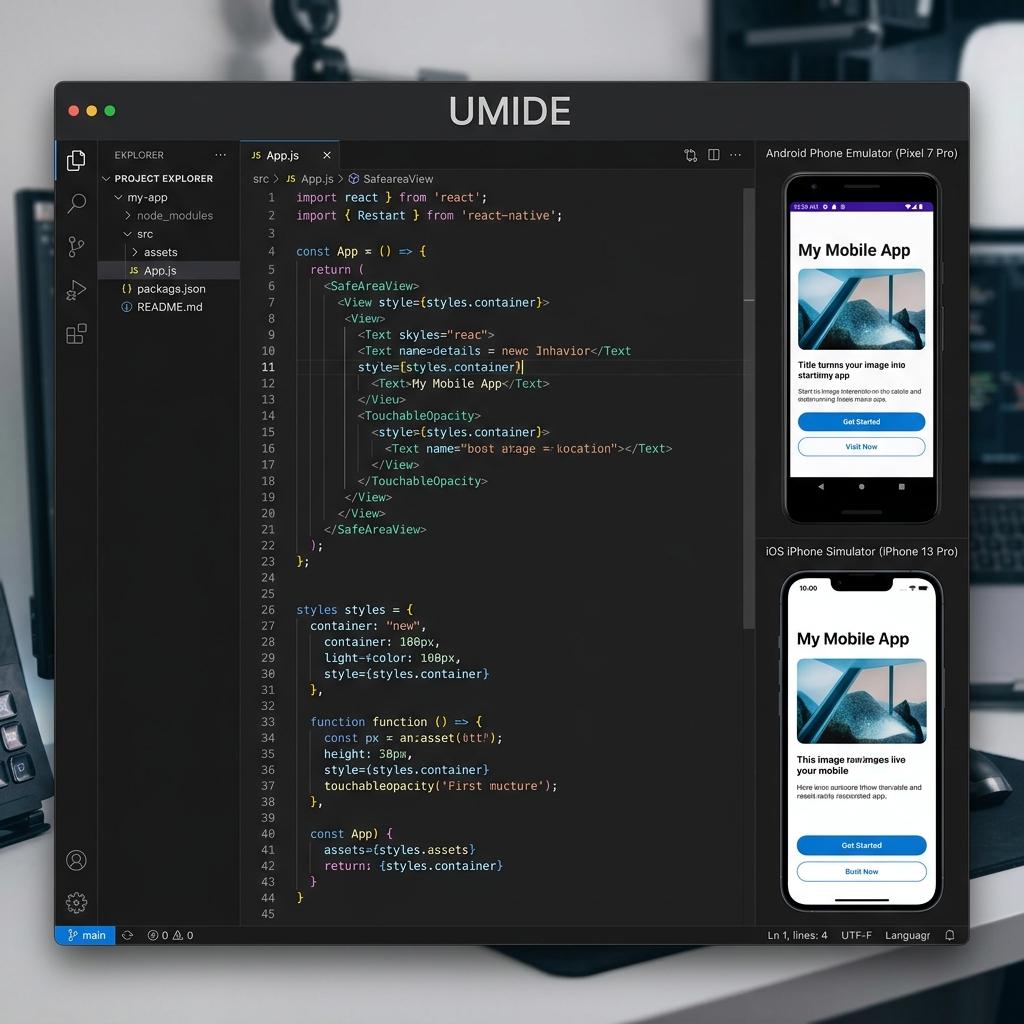
I was tired of being a professional window manager. Let's be real: developing for React Native or Flutter is a pain. It's not the code—it's the overhead. My daily routine was basically a fight with my OS. I'd have my editor open, then I'd have to kick off a build. Then I'd have to drag the Android emulator to one side of the screen. Then I'd realize I needed to check a layout bug on iOS, so I'd fire up the Simulator. Suddenly, my 14-inch MacBook screen was a graveyard of overlapping windows. I was spending more time Alt-Tabbing and resizing Android Studio and Xcode windows than I was actually writing features. The breaking point was the context switching. Every time I jumped from my code to a separate emulator window, I lost my flow. It's a tiny mental tax that adds up to a massive headache by 4 PM. I hated having to keep those heavy, resource-hogging IDEs open just to see my app run. I didn't want a "suite" of tools. I wanted one tool that actually understood that mobile devs need to see their code and their devices at the same time, without the clutter. So, I sat down and tried thinking. What if I built an IDE just for mobile devs that eliminates or reduces this friction? That's how UMIDE (Unified Mobile IDE) was born. It's a native IDE built in Rust. No Electron bloat. It takes the Android Emulator and the iOS Simulator and pins them directly into the editor as resizable panels. They stay where you put them. No floating windows, no searching for the right tab, and no more fighting with Xcode just to see a UI update. I built this because I wanted my focus back.
UMIDE isn't just a fancy wrapper for VS Code. I didn't want the weight of Electron or the overhead of a thousand unused plugins. I built it from the ground up in Rust, sitting on top of Lapce—which is, hands down, one of the fastest editors I've ever touched. Inside, you get the stuff that actually matters:
  • Everything is fast: Rust doesn't mess around. The editor feels like it's keeping up with your thoughts, not the other way around.
  • Proper Tooling: I made sure LSP support (autocompletion, diagnostics) and Vim mode were solid from day one. If I'm building an IDE, I’m using it myself, and I can't live without my Vim keys.
  • Embedded Emulators: This was the "North Star." Both Android and iOS are just specialized panels inside the IDE. You resize the editor, they resize with you. It sounds small, but once you try it, you can't go back to floating windows.

Embedding a live emulator inside another app sounds like a fun weekend project. It took way longer than that. Android actually has a pretty cool gRPC endpoint that streams H.264 video. I ended up writing a gRPC client in Rust to catch those frames, but then I had to figure out how to decode them without turning my laptop into a heater. I used VideoToolbox for hardware acceleration, which kept everything smooth and lag-free. iOS was the real challenge. Apple doesn't just "give" you a stream. The Simulator is its own locked-down environment. I had to get my hands dirty with Objective-C++ and C++ to bridge macOS native APIs into Rust. I built a custom crate (umide_native) to hide all that ugly, unsafe FFI code so I could call it from Rust with a clean API:
let view = NativeEmulatorView::new(handle, x, y, width, height, EmulatorPlatform::Ios)?;
view.attach_device(&device_id);
view.show();
Underneath that simple show() call is a mountain of ScreenCaptureKit calls and Metal rendering logic that I never want to see again. UMIDE’s UI uses Floem, a GPU-accelerated Rust framework. At one point, the emulator panels simply refused to fill the screen properly. I spent three hours chasing a layout bug only to realize it was a flexbox quirk in the underlying layout engine (Taffy). height: 100% just doesn't work when the parent's height is dynamic. I ended up switching everything to flex_grow(1.0). Beyond layout, I also had to solve the "embedding gap." I ended up forking Floem and patching a local version to expose the raw window handle. To explain it simply: I needed a way for the UI framework to "talk" directly to the operating system's windowing system. This enabled the C++ code to find exactly where the UMIDE window was on the screen so it could perfectly "stitch" the emulator views into the Rust-rendered interface.
Writing the code is the fun part. Shipping it on macOS is a journey through purgatory. Every single build has to be code-signed, submitted to Apple for "notarization," and then "stapled" so it works when the user is offline. If you miss one step, macOS treats your app like malware. I spent a full week just wiring all of this into GitHub Actions so that when I push a tag, it builds, signs, and notarizes a DMG for Intel and Apple Silicon automatically.
Rust is worth the pain. The learning curve is steep, and fighting the borrow checker is real, but once your code compiles, it just works. I didn't have a single "mystery crash" at the language boundary, which is a miracle considering how much C++ and Objective-C I was juggling. Flexbox is universal. Whether I'm writing CSS, SwiftUI, or Rust UI code, the underlying mental model is the same. Master flexbox, and you can build anything. Ship it. I could have spent another year polishing every pixel, but I needed this tool now. It’s open source, it’s out there, and it’s already making my workdays easier.
If you're as tired of window management as I am, check it out. It’s open source, and I’d love to hear what you think. Windows and Linux support is on the roadmap (the emulators are the hard part), but the IDE itself is ready to go.
Built with a lot of Rust, a bit of Objective-C, and way too much caffeine.

Enjoyed this blog?

Seriously, thank you for spending your time here. If you made it to the end, you’re the kind of person who cares about craft, not just quick fixes.If you’d like to support my work, pick one (no pressure). It genuinely helps me keep writing and improving these blogs.
Subscribe to get a heads-up when I publish the next one. I keep it low-volume, and I only send what I’d personally want to read.

Subscribe to Josias's Newsletter

I occasionally write about software engineering, technology, and share thoughts on innovation and engineering.
One last thing: if you know someone who’d benefit from this, sharing it with them is one of the best compliments you can give. I appreciate you.