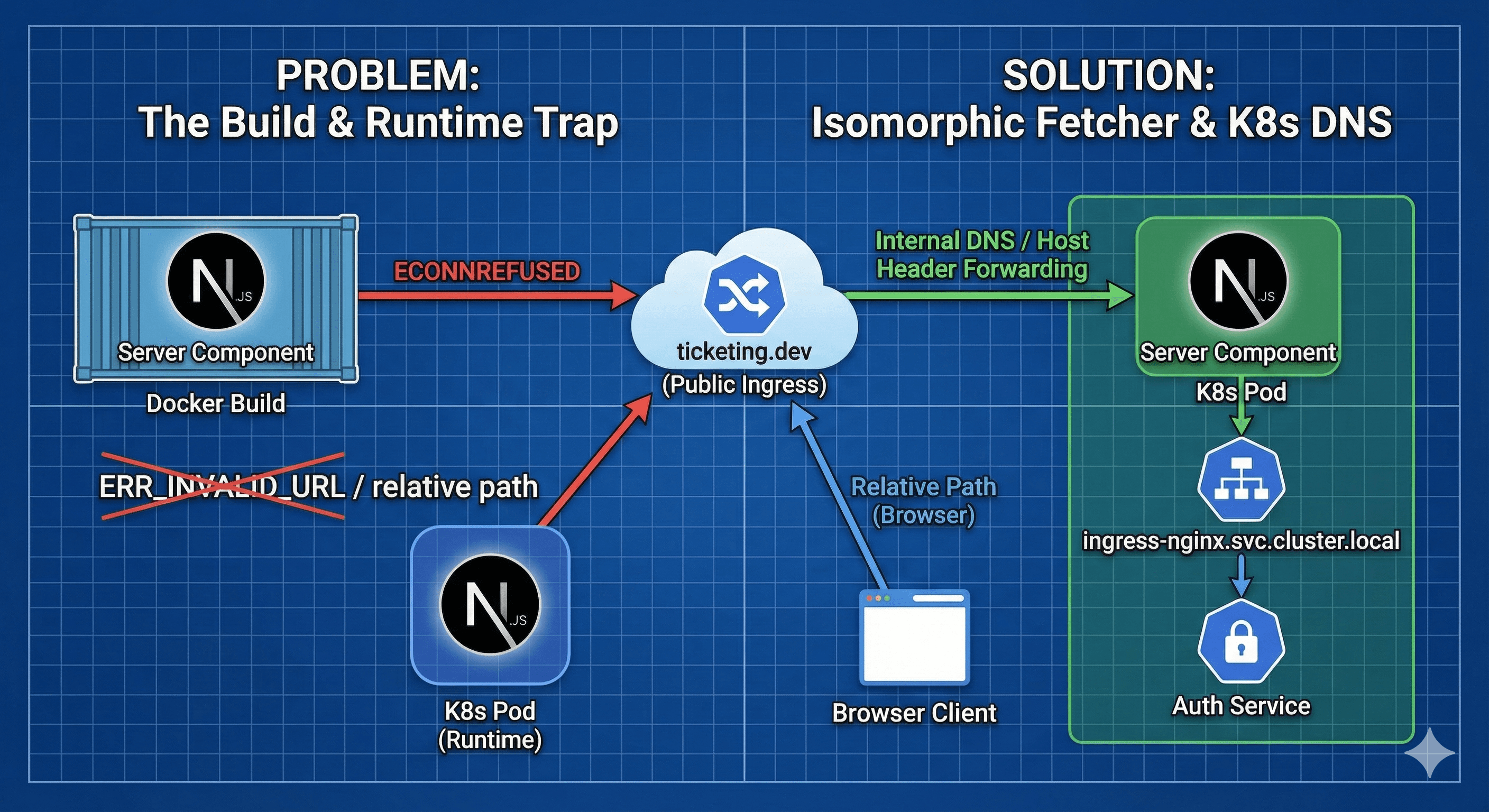
Next.js in Kubernetes: Solving the ECONNREFUSED and Build-Time Fetch Nightmares
December 19, 2025
The Problem That Makes No Sense
If you're building a microservices architecture with Next.js as your frontend, you've probably hit this wall. And it feels completely illogical.You run your app locally in development mode? It works perfectly. You run client-side fetching? Works great. But the moment you try to fetch data from a Server Component or build your Docker image, everything explodes with ECONNREFUSED or ERR_INVALID_URL.I recently encountered this exact nightmare while following a microservices tutorial where I was building a ticketing system. I was learning about Kubernetes, Docker, and microservices architecture, and this error completely blocked my progress for days. After finally solving it, I realized this is a problem that many developers face but isn't well-documented. So I wanted to share what I learned to save you the headache I went through.Let me walk you through why this happens and, more importantly, how to architect your Next.js app to handle Kubernetes networking gracefully.
The Scenario
Here's what I was working with - a standard microservices setup running in Kubernetes:
Ingress Nginx: Routing traffic based on the host ticketing.dev
Auth Service: Handling users at /api/users
Client Service: A Next.js 16+ app using the App Router
When I tried to build the Docker image with docker build ., the entire process crashed with exit code 1. Frustrating doesn't even begin to describe it.
The Root Cause: "Where Am I?"
To fix this, we need to understand that Next.js Server Components run in two very specific execution contexts that are hostile to standard Kubernetes networking.
1. The Build-Time Trap (The Docker Context)
The error logs show the failure happening during RUN yarn build. Here's what's happening: by default, Next.js attempts to pre-render (Static Generation) every page. This means during the build process—inside your isolated Docker container—Next.js executes your component code to fetch data and generate HTML.Why does this fail?The relative path error (/api/...): Node.js (unlike the browser) has no concept of a "current page origin." It requires an absolute URL. There's no browser context during a Docker build.The connection error (ticketing.dev): Inside the Docker build container, ticketing.dev (mapped via your host machine's /etc/hosts) typically resolves to 127.0.0.1 (localhost).Here's what happens step by step:
The build container looks at itself (localhost)
It asks: "Do I have an Auth Service running on port 443 inside this container?"
The answer is No. The Auth Service is in a totally different container/pod.
Result: ECONNREFUSED
2. The Runtime Trap (The Cluster Context)
Even if you skip the build, running this inside Kubernetes has a similar issue. When a Server Component runs inside a Pod, it cannot easily access the Ingress Controller via the public URL
https://ticketing.dev
because of "NAT hairpinning" or DNS resolution issues within the cluster.Think about it this way: the browser is outside the cluster; the Server Component is inside. They need different maps to find the treasure.
The Solution: A 3-Step Strategy
We need to tackle this from three angles:
Disable Static Generation for user-specific pages
Create a URL resolution utility
Configure internal cluster headers
Let's implement each one.
Step 1: Force Dynamic Rendering
Since this page relies on the "Current User" (which depends on cookies/sessions), it cannot be statically generated at build time. There's literally no user logged in during a Docker build!We must tell Next.js to skip the build-time fetch for this page:
// app/page.tsx
import { api } from "@/lib/axios";

// This prevents the build-time execution error!
export const dynamic = "force-dynamic";

export default async function Home() {
  // Now this only runs at runtime, not build time
  const response = await api.get("/users/currentuser");

  return <div>{/* Your UI */}</div>;
}
The export const dynamic = 'force-dynamic' directive is crucial here. It tells Next.js: "Hey, don't try to pre-render this page during the build. It needs to be generated fresh on every request."
Step 2: The "Isomorphic" Fetcher
Now for the clever part. We need a utility that automatically switches the base URL depending on where the code is running—Browser vs. Server.If we're on the Server (inside Kubernetes), we should talk directly to the Ingress Nginx service (or the specific microservice) to keep traffic internal and fast. If we're in the Browser, we can use relative URLs.Create a robust Axios client or fetch wrapper:
// lib/api-client.ts
import axios from "axios";
import { headers } from "next/headers";

const buildClient = () => {
  if (typeof window === "undefined") {
    // We are on the Server (inside a Kubernetes Pod)!

    // RECOMMENDED: Use Ingress as the single entry point
    // This keeps your client decoupled from individual services
    // The Ingress handles routing to the correct backend service
    // Format: http://<service-name>.<namespace>.svc.cluster.local
    return axios.create({
      baseURL:
        "http://ingress-nginx-controller.ingress-nginx.svc.cluster.local",
      headers: {
        // IMPORTANT: Forward the Host header so Ingress knows which routing rule to apply
        Host: "ticketing.dev",
        // IMPORTANT: Forward cookies/auth headers for authentication
        ...headers(),
      },
    });

    // ALTERNATIVE (NOT RECOMMENDED): Direct Service Communication
    // Only use this if you have a specific performance requirement
    // This couples your client to knowing about specific service names
    /*
    return axios.create({
      baseURL: "http://auth-srv:3000/api",
      headers: headers(),
    });
    */
  } else {
    // We are in the Browser!
    // Use relative URLs - the browser knows the current domain
    return axios.create({
      baseURL: "/",
    });
  }
};

export default buildClient;
Understanding the Options
Option A (Ingress Communication) is the recommended approach for most cases:
Service Decoupling: Your Next.js client doesn't need to know about individual service names, ports, or locations. It only knows about the Ingress endpoint.
Single Entry Point: The Ingress acts as a gateway and handles all routing logic based on paths and hosts.
Consistency: The same routing rules that work externally work internally. If you change service names or reorganize services, the client code doesn't need to change.
Centralized Logic: Authentication, rate limiting, and other middleware at the Ingress level apply uniformly.
Scalability: As you add more microservices, your client code remains unchanged—just update Ingress rules.
Option B (Direct Service Communication) is an advanced optimization for specific cases:
You've identified a performance bottleneck with Ingress routing
You're making high-frequency calls to a single service
You're willing to tightly couple your client to specific service names
The Bottom Line: Use Option A (Ingress). It keeps your architecture clean and maintainable. The Ingress handles all the routing, so your Next.js app doesn't need to know whether /api/users goes to auth-srv, user-service, or anywhere else. That's the Ingress's job.The key insight here is the Host header. When you call the Ingress service internally, it needs to know which routing rule to apply. That's why we forward Host: "ticketing.dev". The Ingress then looks at the request path and routes it to the appropriate backend service automatically.
How the Routing Flow Works
Here's what happens when you use the Ingress approach:
Your Next.js Server Component (running in a Pod) makes a request:
GET http://ingress-nginx-controller.ingress-nginx.svc.cluster.local/api/users/currentuser
Headers: { Host: "ticketing.dev", Cookie: "..." }
The Ingress Controller receives the request and examines:
The Host header: ticketing.dev
The request path: /api/users/currentuser
The Ingress applies its routing rules:
# If host matches "ticketing.dev" AND path matches "/api/users/*"
# Then route to auth-srv:3000
The request is forwarded to the Auth Service:
GET http://auth-srv:3000/api/users/currentuser
The Auth Service responds, and the Ingress forwards the response back to your Next.js component.
The beauty of this approach: Your Next.js app only knows about one endpoint (the Ingress). If you decide to:
Rename auth-srv to user-service
Move it to a different namespace
Split it into multiple services
Change ports
...you only update your Ingress rules. Your Next.js code stays the same!
Step 3: Implementing in the Page
Now let's update your page component to use the builder:
One thing that tripped me up initially: cookies and authentication headers. When your Server Component makes requests, it needs to forward the user's authentication state.The headers() function from Next.js does exactly this—it gives you access to the incoming request headers, including cookies. This is crucial for authentication to work properly.
import { headers } from "next/headers";

const buildClient = () => {
  if (typeof window === "undefined") {
    return axios.create({
      baseURL: "http://auth-srv:3000",
      headers: headers(), // This forwards cookies and auth headers!
    });
  }
  // ... browser client
};
Understanding Kubernetes DNS
Let me break down the Kubernetes internal DNS format because it's not immediately obvious:
service-name: The name of your Kubernetes Service (e.g., auth-srv, ingress-nginx-controller)
namespace: The Kubernetes namespace where the service lives (e.g., default, ingress-nginx)
svc.cluster.local: Standard Kubernetes cluster domain
For example:
Auth service in default namespace: http://auth-srv.default.svc.cluster.local:3000
Ingress in ingress-nginx namespace: http://ingress-nginx-controller.ingress-nginx.svc.cluster.local
You can often omit the namespace if you're calling a service in the same namespace: http://auth-srv:3000
Testing Your Setup
Here's how to verify everything works:
1. Test the Build
docker build -t my-nextjs-app .
If this completes without errors, your build-time issues are solved!
2. Test in Kubernetes
Deploy your app and check the logs:
kubectl logs -f deployment/client-depl
You should see successful requests without ECONNREFUSED errors.
3. Test from Browser
Open your app in the browser and check the Network tab in DevTools. Client-side requests should work seamlessly.
Common Pitfalls and Troubleshooting
Still Getting ECONNREFUSED?
Check your service names: Run kubectl get services -A to verify the exact service names
Verify namespaces: Make sure you're using the correct namespace in your DNS
Check service ports: Confirm the port numbers match your service definitions
Headers Not Forwarding?
Make sure you're using headers() from next/headers and not trying to access request.headers directly. The Next.js API changed in App Router.
Build Still Failing?
Double-check that you've added export const dynamic = 'force-dynamic' to any pages that fetch user-specific data.
Summary
When moving Next.js to Kubernetes, remember these key principles:
Build vs. Runtime: User data doesn't exist at build time. Use export const dynamic = 'force-dynamic' to prevent yarn build from failing on dynamic routes.
Relative vs. Absolute: Server Components (Node.js) require absolute URLs; Client Components (Browser) can use relative URLs.
Use Ingress as Your Gateway: Don't hardcode individual service names in your Next.js app. Route everything through your Ingress Controller. This keeps your frontend decoupled from your backend service topology.
Internal DNS: Inside the cluster, use Kubernetes internal service DNS (e.g., http://ingress-nginx-controller.ingress-nginx.svc.cluster.local) instead of public domains.
Forward the Host Header: The Ingress needs the Host header to match routing rules. Always include Host: "your-domain.com" in your internal requests.
Context Awareness: Your code needs to know where it's running. Use typeof window === "undefined" to detect server vs. client context.
Header Forwarding: Always forward authentication headers and cookies using headers() from next/headers for Server Components.
The beauty of this approach is that once you set it up, it works seamlessly. Your Server Components can fetch data efficiently within the cluster, your Client Components work normally, and your builds succeed without any gymnastics. Plus, your architecture stays maintainable because your Next.js app doesn't need to know about your microservices structure—the Ingress handles all of that for you.This solution saved my learning journey and allowed me to continue with the microservices tutorial. I hope sharing these insights helps you avoid the days of frustration I experienced. Sometimes the best lessons come from the problems we solve ourselves!Happy shipping! 🚀
Enjoyed this tutorial?
Seriously, thank you for spending your time here. If you made it to the end, you’re the kind of person who cares about craft, not just quick fixes.If you’d like to support my work, pick one (no pressure). It genuinely helps me keep writing and improving these tutorials.